
Centrik SmartDocs vs Web Manuals
Your manuals should prove compliance,
not consume your team.
Looking for a Web Manuals alternative? Centrik SmartDocs is a WebManuals alternative built for aviation teams on webmanuals.aero today. Author, review, approve and distribute in one aviation-native platform. Unlimited authors and readers, AI grounded in the regulations you operate under, and pricing that scales with your operation rather than your headcount.
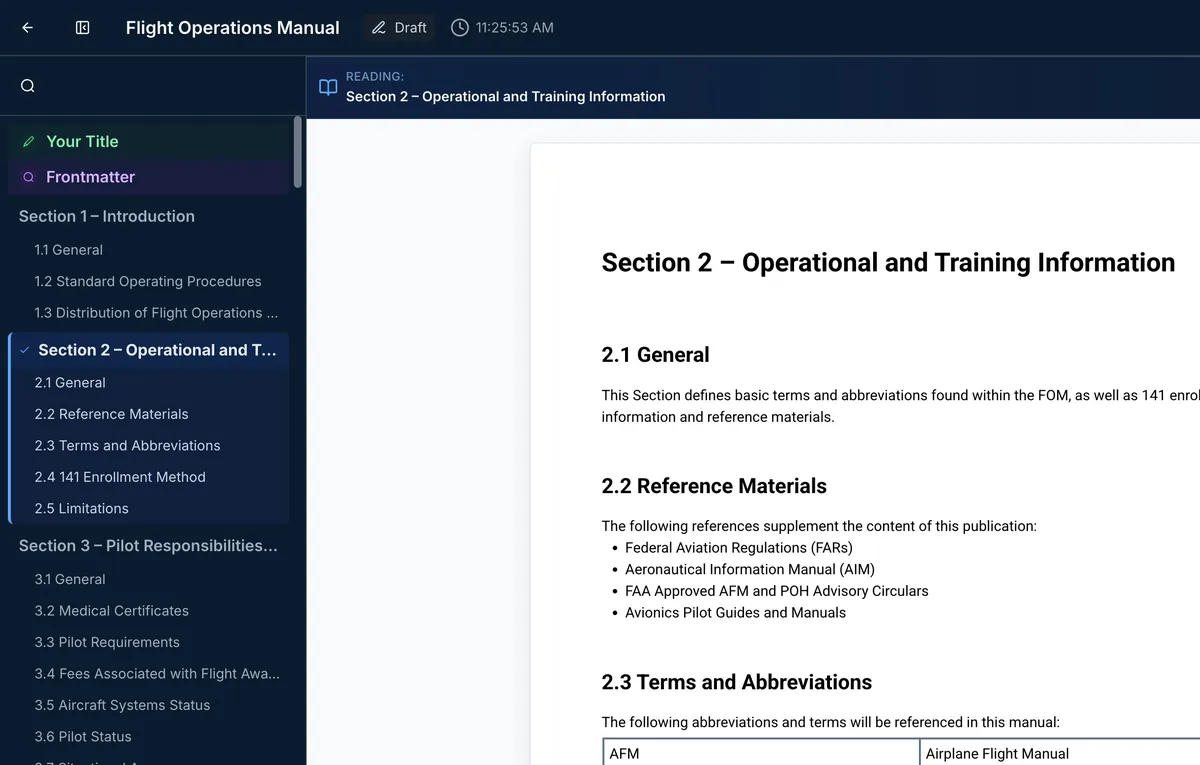
Grounded in the regulations you operate under. EASA, FAA, UK CAA, and more.


Why SmartDocs
Why Aviation Teams Choose SmartDocs
Keeping a manual estate current is document control, regulatory monitoring and distribution at the same time. SmartDocs does all three in one place.
Unlimited authors and readers, included
Pricing scales with the size of your operation, not the size of your team. Adding a subject matter expert to a review costs nothing, so the people who know the procedure are the people who write it.
AI included as standard, grounded in your regulations
Not a paid add-on, and not the open web. Every suggestion is grounded in your own manuals and the regulatory library you operate under, and a person approves every change before it is applied.
Regulatory change, mapped to your manuals
Link a manual section to the regulation it satisfies. When that regulation changes, the affected sections are flagged for review automatically, instead of being found by hand across every document you hold.
Side by Side
How SmartDocs Compares
Sixty-four capabilities, compared line by line. A green check means included in the base price. “Paid add-on” means available at extra cost. “Partial” means the capability is limited compared with a full implementation.
Integrated Aviation Solution
Integrated Management System
One integrated aviation platform covering safety, quality, documents and operations, with shared users, actions and data.
Safety Management System (SMS)
Aviation SMS: safety reporting, risk management, and compliance monitoring.
Quality Management System (QMS)
Audit, findings, and quality compliance management.
Document Management System (DMS)
Controlled storage, versioning and distribution of documents.
Document Authoring
Structured authoring environment for producing controlled documents.
Regulation Library
Vendor-maintained library of aviation regulations.
Aviation Services
SME-driven fleet technical services, asset management, publication authoring, and consulting.
Platform & Security
Single Sign-On (SSO)
Log in via your existing identity provider (OIDC/SAML), included in the base price.
Multi-Factor Authentication (MFA)
Second factor on login, included in base price.
Access Management (users, roles, organization units)
Central admin of users, custom roles, org-structure groups driving permissions and distribution.
Granular Access Control (ABAC/RBAC)
Per-document and per-document-type permissions; same user different roles in different org units.
Action Management
Central task queue of assigned document reads/reviews with manager oversight, reminders, deadline adjustment.
Notifications
In-app + email notifications for distribution, reviews due, actions.
Secure managed cloud hosting
SaaS, 99.9% availability SLA, managed backups/failover.
Security Architecture
Encryption at rest/in transit, tenant isolation, penetration testing.
Audit Trails
Per-user and per-action audit logging; superseded versions retained and retrievable.
AI Trust & Governance
AI grounded in customer’s own content, human approval of AI output, no training on customer data, can be disabled per customer.
Document Management
Document Storage and Library Organization
Hierarchical folders plus tag/type-based collections.
Versioned Document Containers
One document entity tracks all its versions (digital and PDF) in one place.
Integrated PDF reading
PDFs open in-app, no external software; per-document download/print permissions.
Document type management
Define a type once (permissions, workflow roles, retention, distribution defaults, read deadlines) and every document of that type inherits it.
Version control
Only latest approved version in circulation; superseded retained for audit.
Document lifecycle management
Review-by and expiry dates with 30/60/90-day dashboard and reminders.
Retention period enforcement
Per-type retention periods enforced automatically.
Document distribution with read & sign
Distribute by person/role/org-unit; acknowledgement actions generated, tracked, late readers chased automatically.
Change request management
Anyone raises a change request anchored to exact text; tracked through lifecycle to incorporation.
Document tagging
Admin-managed tag taxonomy; filter library by tag.
PDF Import (AI conversion)
Upload a PDF and AI converts it into a fully editable structured document.
Word Import
Upload .docx and structure/headings/tables/images convert into the structured editor.
Library Search
Find documents by title/metadata with filters.
Aviation Ops Platform / EFB Integration
Published manuals flow automatically into an operational aviation platform, such as a safety, quality or operations system, and EFB for distribution and read-and-sign, without separate document handling. For SmartDocs, that platform is Centrik.
Document Reading
Modern Digital Reading
Pageless, chapter-based reading that stays fast on very large manuals (not just a PDF viewer).
Navigation by Document Structure
Structure sidebar, jump to any section, in-document links.
In-line Document and Regulation Hyperlinks
Links from procedures to other documents and to live regulatory text.
Version Comparison View
See exactly what changed between any two versions, highlighted, with minor-change filtering.
Integrated Change Request Submission
Readers raise change requests from within the document, anchored to text.
Automated Compliance Artifacts
Record of Revisions, Summary of Changes, List of Effective Sections/Pages, compliance table generated automatically as live views and in the exported PDF.
High-fidelity PDF Export with Change Bars
One-click paginated PDF with headers/footers/page numbers/artifacts populated, change bars marking revisions.
AI Document Assistant (Reader)
Ask questions about the open document, grounded answers with regulatory context.
Document Authoring
Word-style Structured Editor
Familiar Word-like editing with enforced hierarchical document structure, validation, tables, images, formatting; built for very large manuals.
Configurable Cover Pages
Branded cover page templates.
Configurable Headers and Footers
Header/footer templates with logo and metadata fields for PDF output.
Automatic ToC and Control Artifacts
ToC, RoR, LES/LEP, compliance table generated automatically, always current.
Auto-generated Summary of Changes
Changes between versions detected automatically and compiled, with minor-change flagging.
Monitored Regulation Links
Link manual sections to the regulations they satisfy; when the regulation changes, impacted sections are flagged for review.
Monitored Cross-document Links
Link a section in one manual to a section in another; authors notified when the linked content changes.
Review and Approval Workflow
Configurable multi-step review/approval inside the document, tracked comments and decisions, resumes (not restarts) after changes.
Collaboration
One author at a time with concurrent commenting/review by any number of users; comments anchored to exact text.
AI Template Generation
Describe your operation and AI generates an aviation-specific document structure grounded in regulations.
AI Authoring Assistant
AI drafts sections, suggests compliant content, flags compliance gaps; author confirms every change.
Process Map Embedding
Embed process map images linked to underlying procedures.
External and Regulator Review Access
External parties (e.g. the regulator) participate in document review without organization-issued accounts.
Ready-made manual template library
Vendor-provided aviation manual templates as starting points.
Regulatory Content & Intelligence
Managed Regulation Repository
120+ regulations/standards/guidance maintained by the vendor (EASA, FAA, UK CAA etc.), standardized into one searchable format.
Regulation Reading and Citation Tools
Copy with citation, publication/effective dates.
Regulation Change Tracking
Side-by-side diff of any regulation against previous versions.
Regulations AI Agent
Plain-language regulatory Q&A with verifiable citations, grounded in the repository (not the open web).
Mobile Access
Native Mobile App (iOS)
Native app for iPad and iPhone.
Mobile Document Library + Reader
Copy with citation, publication/effective dates.
Mobile Read and Acknowledge
Side-by-side diff of any regulation against previous versions.
Offline Document Access
Plain-language regulatory Q&A with verifiable citations, grounded in the repository (not the open web).
Android App
Native app for Android devices.
Getting Started
Structured Implementation Service
Vendor-run onboarding: tenant setup, configuration, training, document import; managed migration option.
Technical Publishing Services
Vendor’s technical writing team available for manual writing/revision.
What Sets It Apart
What Makes SmartDocs Different
Write in a familiar editor. Publish a structured manual.
Specialist authoring tools ask your subject matter experts to learn a new discipline before they can contribute a single paragraph. Word-style editing sits on top of enforced aviation structure, so the people with the operational knowledge write directly into the manual and the output is compliant by construction.
Compliance artefacts generated, not assembled.
Table of contents, list of effective sections, record of revisions and summary of changes are produced from the document itself and are always current. Change bars are applied automatically and suppressed for minor revisions, so the revision pack is ready when the document is.
A regulatory library that maintains itself.
More than 120 regulations, standards and guidance documents maintained for you across EASA, FAA, UK CAA and other authorities, standardised into one searchable format with full change tracking. Ask a question in plain language and get an answer cited back to the regulation, not to the internet.
Publish into Centrik. No migration, no new EFB approval.
For operators already running Centrik, approved documents flow into the platform your crews use every day. Existing users keep their accounts, your document library does not move, and the EFB environment you have already had approved stays exactly as it is.
Proven at Scale
Trusted Across the Industry
1,600+
organisations
200,000+
users
120
countries
120+
regulations maintained
Customer Story
London’s Air Ambulance Charity
London’s Air Ambulance Charity adopted SmartDocs across its fleet, bringing controlled documentation into the same platform as its safety and compliance record.
Read the announcement →FAQ
Frequently Asked Questions
Straight answers on switching from Web Manuals, pricing, AI, and how SmartDocs works with Centrik.
Importing and getting started
Can we import our existing manuals?
Yes. SmartDocs supports PDF and Word import with high accuracy, so existing manuals can be converted without retyping.
How accurate is the conversion process?
Conversion accuracy is high, and we recommend review and verification of converted documents before publication.
Can we create custom templates for our organisation?
Yes. Custom templates, including cover pages, headers and your branding, can be created and shared across your organisation. TrustFlight configures these with you during implementation.
Authoring and collaboration
How does collaborative authoring work?
Multiple authors can view and comment on the same document simultaneously. Only one user can edit a given document at a time, keeping the process organised and conflict-free.
Can we customise the review and approval process?
Yes. Administrators configure the number of review steps and which roles act as reviewers and approvers.
What revision content is generated automatically?
Tables of Contents, Lists of Effective Sections, List of Effective Pages, Records of Revision, Summaries of Change and Compliance tables are generated on export, so nothing is built by hand at revision time. Summaries of Change are built from the detected differences between versions, with minor changes automatically excluded.
Regulations
What happens when a regulation changes?
Manual sections can be linked to the regulations that govern them. When a linked regulation is updated, SmartDocs flags the sections that reference it for review before the next revision is published.
Which regulations are covered?
We maintain a core set of commonly used EASA, FAA, and other national authority regulations, with the full list available on request. Additional regulations can usually be added if you need them.
How current is the regulatory content?
The regulatory library is continuously updated. Updates are applied as soon as the official material is published, including executive decisions and amendments. We don’t wait for consolidated versions.
AI and data security
How does the AI work, and is it appropriate for regulated content?
The AI Document Assistant is grounded in your manuals and a managed regulatory library, never the open web. Every suggestion goes through your configured review and approval workflow before it’s incorporated. We always recommend final review by your subject matter experts.
Is our data used to train the AI?
No. Customer data is never used to train, improve, or fine-tune AI models. That is both TrustFlight policy and a contractual requirement with every model provider.
Can we opt out of AI?
Yes. AI features are optional and require explicit signed consent. The core platform works fully without AI, and consent can be withdrawn at any time.
Where is the AI processed?
Inference is processed in the US, Canada, and Europe. Prompts and responses are not stored by the provider beyond the API request lifecycle.
Working with Centrik
We already use Centrik. Does our whole team need to learn to use SmartDocs?
No. Only document authors need SmartDocs training. Everyone else continues using the familiar Centrik interface for document access. There is no user migration and no new EFB approval.
What happens to our existing Centrik documents?
They remain exactly where they are and stay fully accessible. SmartDocs adds authoring for both new and existing documents.
Can readers access documents offline?
Yes. Readers can download documents for offline access through the mobile app, with changes syncing when they reconnect.
Commercial
How is SmartDocs priced?
A set annual fee based on the size of your operation (for example: tails for aircraft operators, bays for MROs), with unlimited authors and readers and AI included. Contact us for a quote.
Is there a limit on authors or readers?
No. SmartDocs has no per-user fees and no per-user metering, so your documentation team can grow without your bill growing.
See It Against Your Own Manuals
Bring a manual section you recognise and we will show you the whole path: draft, review, approval, list of effective sections, summary of change, distribution.
Prefer It as a PDF?
Take the full SmartDocs and Web Manuals comparison with you, to share with your team or bring to an evaluation meeting.
Book a Demo
See SmartDocs for Yourself
Book a demo with the SmartDocs team and see the full lifecycle, from authoring and review to approval and distribution, on documents like yours.
- →Bring a manual section you know and see the whole path, draft to distribution
- →Unlimited authors and readers, priced by operation size, AI included
- →Publishes into Centrik, so there is no migration and no new EFB approval
Book Your SmartDocs Demo
Complete the form and a SmartDocs specialist will be in touch to schedule your demo.