Smart Suggestions
Intelligent Prompts for Safety and Compliance
Smart Suggestions: AI-Assisted Safety and Compliance Management for Centrik
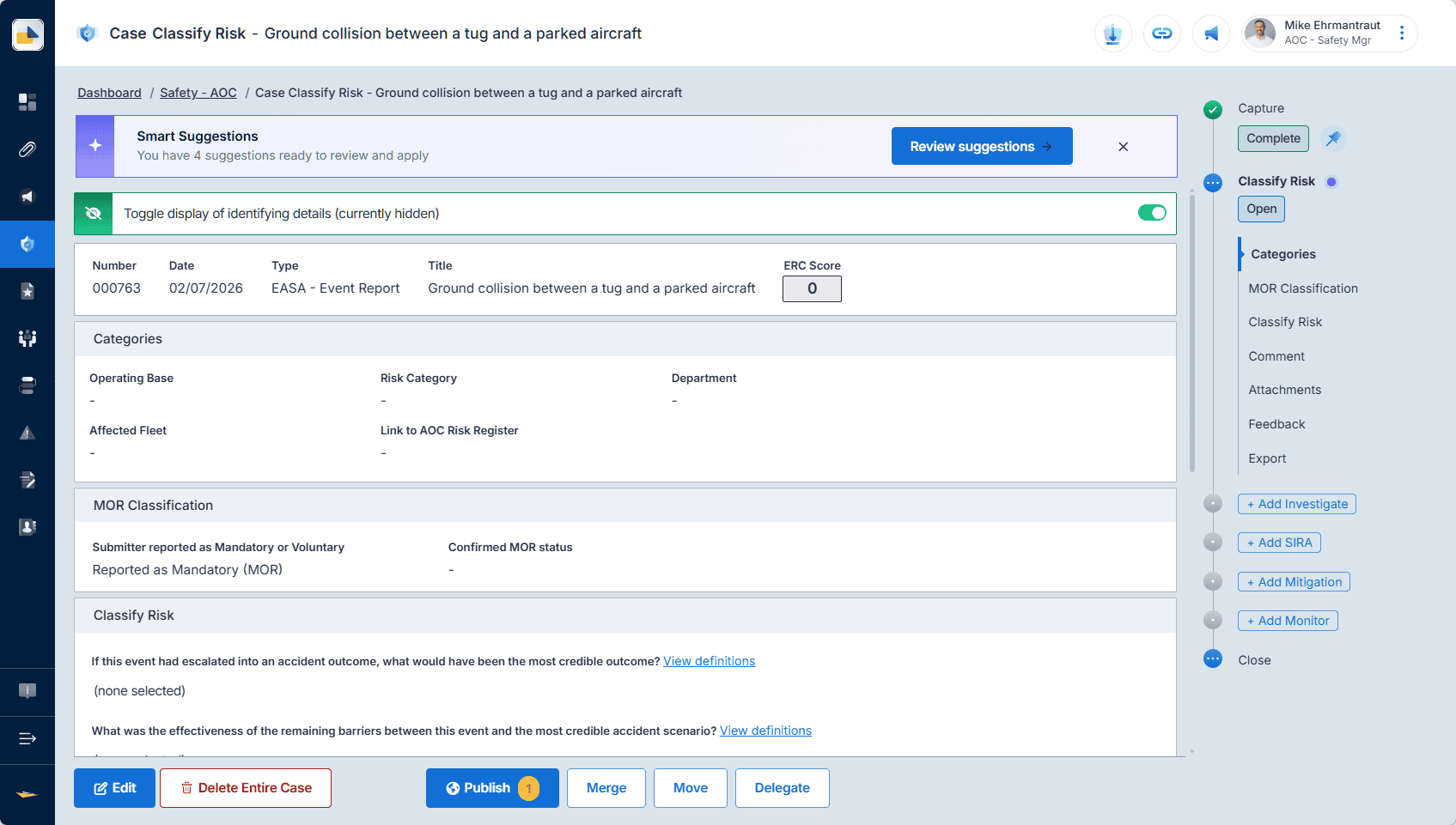
Centrik now surfaces the right information at the right moment: intelligent prompts that flag reports describing the same event or hazard, suggest best-fit categories, and recognise repeat audit findings. Every suggestion is reviewed and confirmed by a person before anything is saved.
Already on Centrik 5? Smart Suggestions is available now and rolling out over the coming weeks: no new module and no additional cost, and because it uses AI, switching it on is a simple opt-in.
See how it works ›Trusted by safety and compliance teams operating under EASA, FAA, UK CAA, and more.

Manual triage should not slow your safety data down.
Every safety report needs the same first questions answered: is it a duplicate, how should it be categorised, and has something like this happened before? Today that work is manual. Officers search recent reports by hand, categories drift between people and teams, and a finding that echoes a past audit depends on someone remembering it.
Smart Suggestions puts an intelligent prompt at each of those moments. Centrik flags reports describing the same event or hazard, suggests best-fit categories learned from your own history, and recognises repeat audit findings: less manual effort, more consistent data, and systemic issues caught earlier.
Your Centrik just got smarter
Three intelligent features across Safety and Compliance reduce manual effort, keep your data consistent, and surface systemic issues earlier, at no extra cost.
Three intelligent features, live across Safety and Compliance.
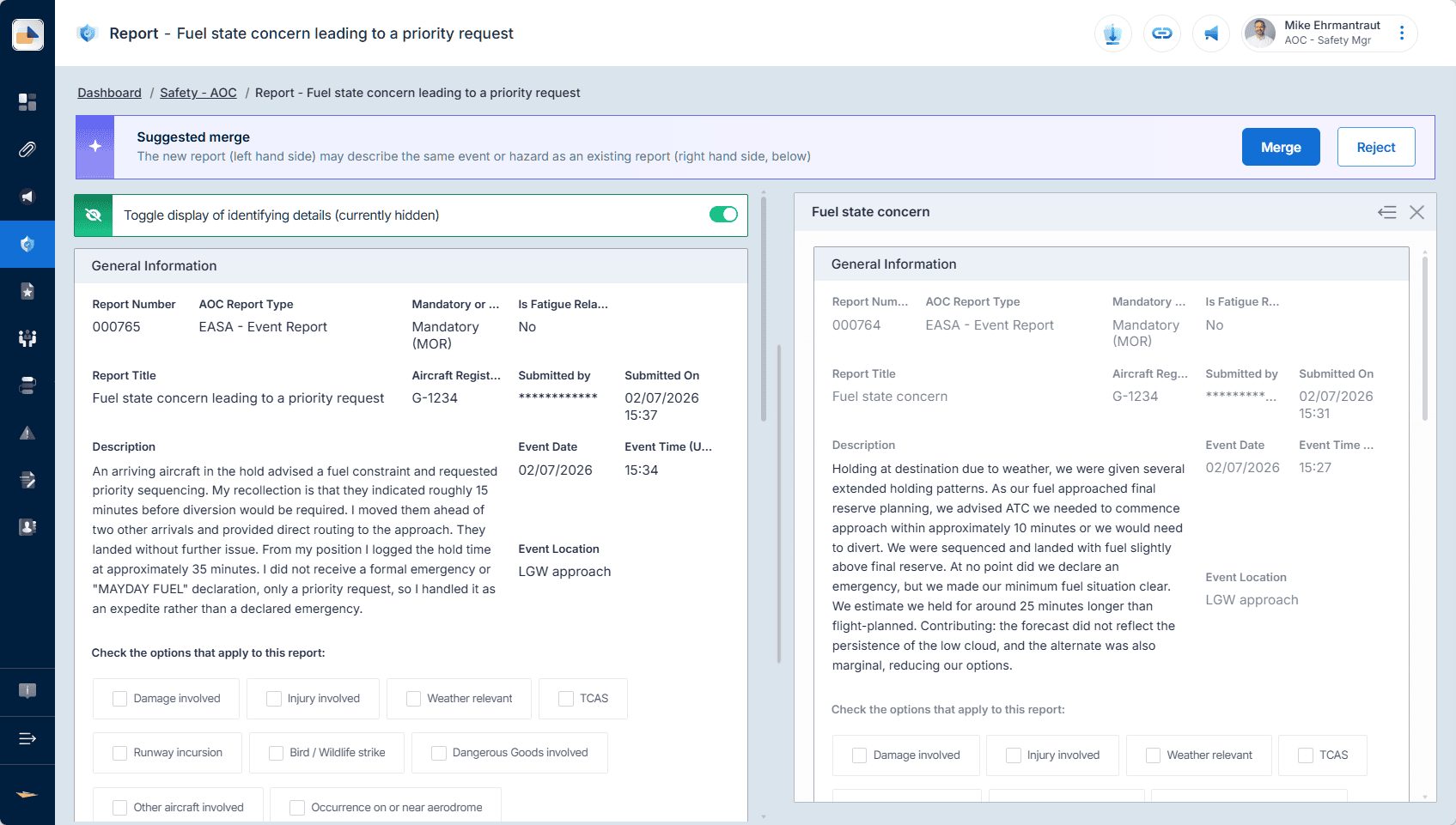

Same Event or Hazard Detection
When a new safety report comes in, Centrik automatically scans recent reports and flags those describing the same event or hazard. Safety officers can confirm, merge, or link in a click: no more hunting through past reports, cleaner cases, and each event or hazard captured in one place.
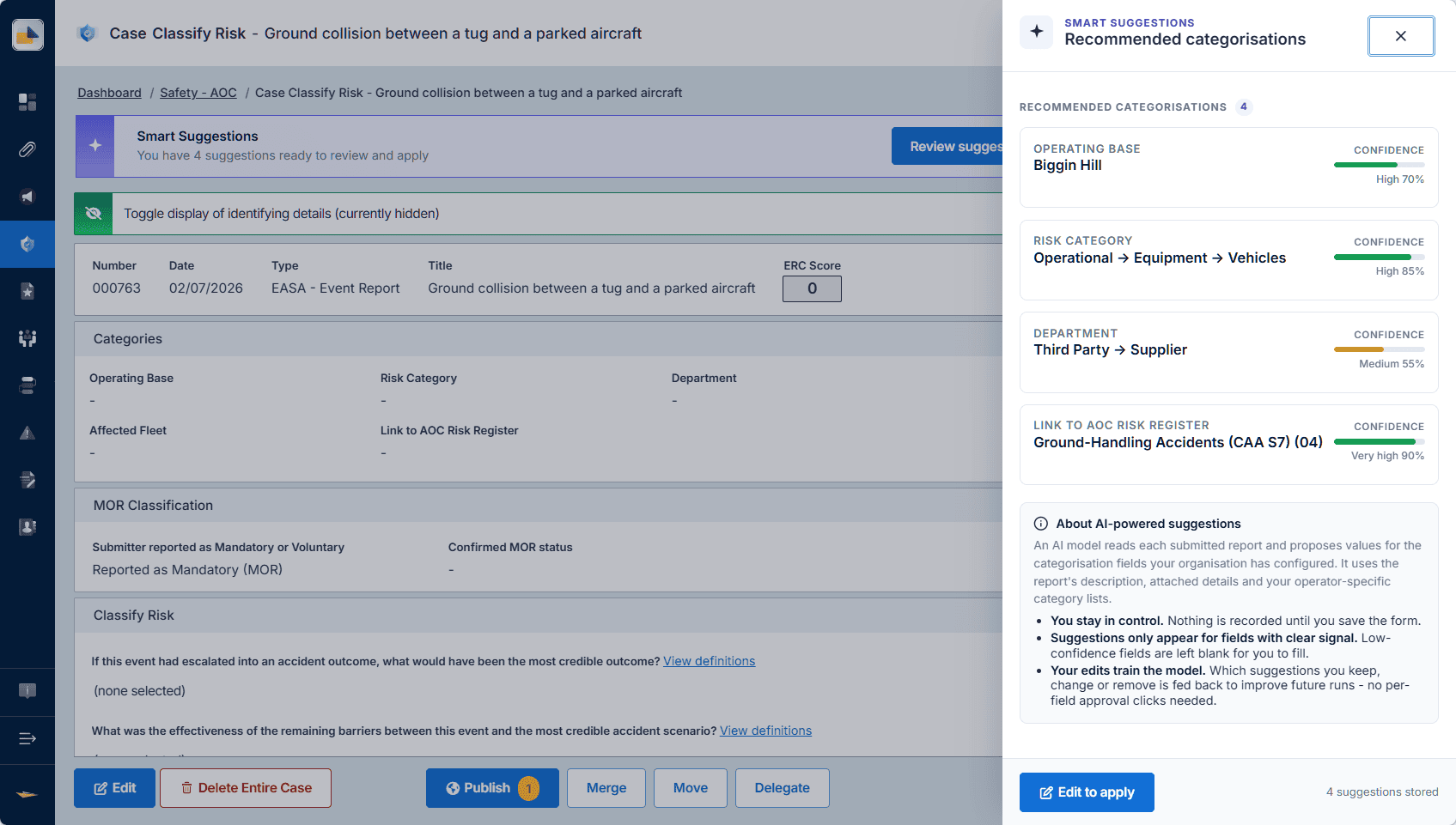

Suggested Categorisation
Centrik suggests the most likely categories for each safety report, learning from how your organisation has classified reports in the past. Officers see the best-fit suggestions to accept or adjust: faster processing, and the classification consistency that reliable analytics and reporting are built on.
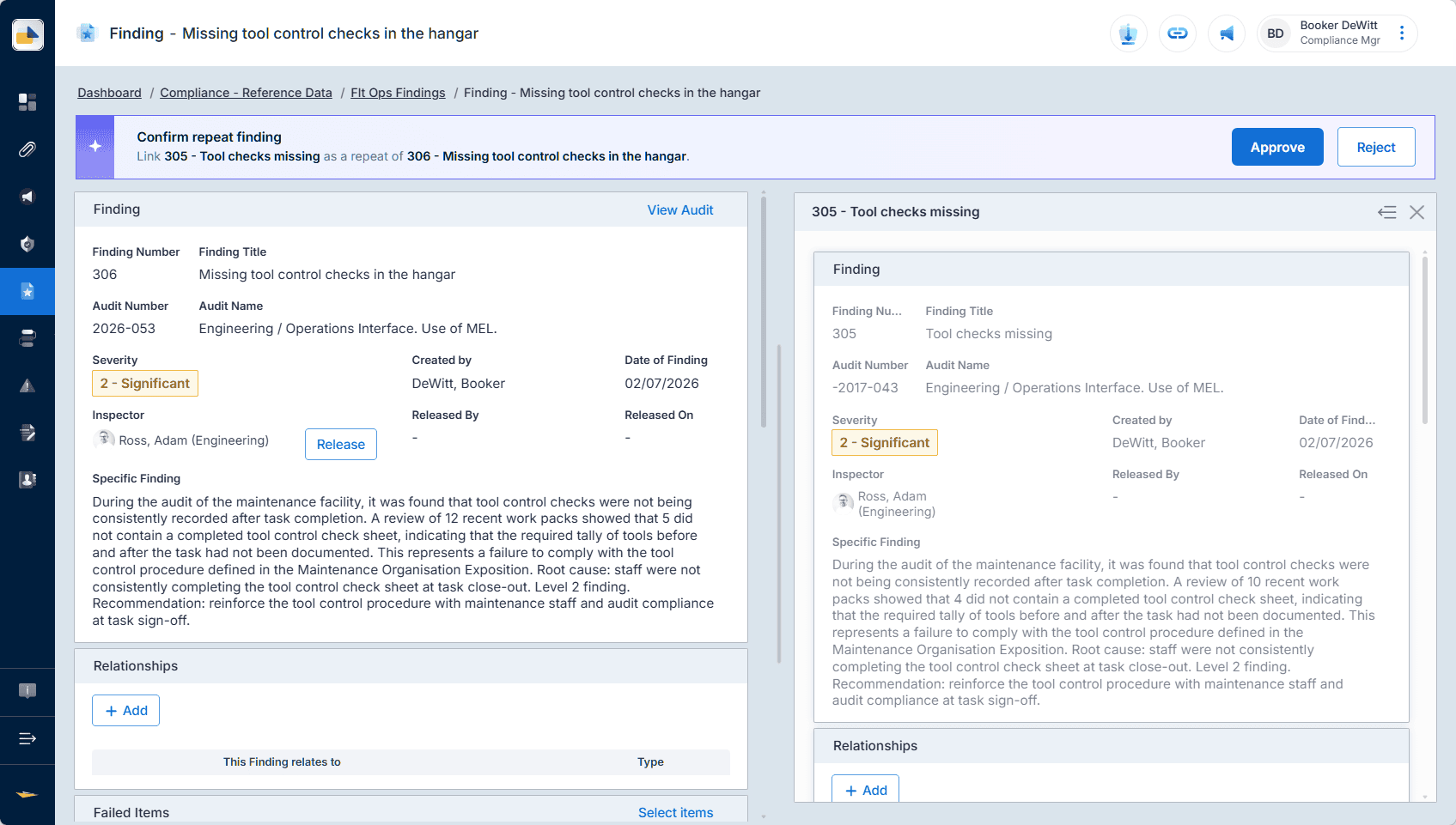

Repeat Findings Detection
In Compliance, Centrik recognises when a new audit finding resembles findings from the past and flags it for the auditor. A safety net for spotting recurring problems, strengthening corrective action, and building stronger evidence for trend analysis and regulator reporting.
Already on Centrik 5?
Built into Centrik. Working from day one.
Smart Suggestions runs inside the Centrik modules your team already uses. Safety officers see same-event and category prompts as reports come in, and auditors see repeat-finding prompts in Compliance. Nothing to install, nothing to migrate, and nothing extra to pay; because it uses AI, switching it on is a simple opt-in.
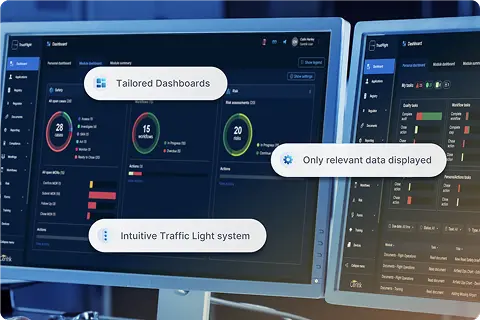
Built for how safety and compliance teams work
Suggestions, not decisions.
Officers and auditors review and confirm, or override, before anything is saved. Centrik never auto-merges reports or auto-classifies occurrences.
Inside the workflow you already use.
Prompts appear directly in Centrik’s Safety and Compliance modules. No new screens to learn and no separate tools to switch between.
Learning from your own history.
Suggested categories reflect how your organisation has classified reports in the past, so suggestions fit the way your operation actually works.
Consistent data you can build on.
Cleaner cases and consistent classification are the foundation of reliable safety intelligence, trend analysis, and regulator reporting.
Included at no extra cost.
Smart Suggestions is available now to Centrik customers as part of their existing subscription, rolling out over the coming weeks. No add-on, no new module, no per-user fees.
The first wave of Centrik AI.
Smart Suggestions extends TrustFlight’s AI heritage into the proven Centrik platform, with more planned smart features to help with ERC scoring, meeting minutes, findings categorisation and more.
See Smart Suggestions live.
Join us on Monday 27 July 2026 at 14:00 BST for a live 45-minute demo of Smart Suggestions, the first wave of Centrik’s AI roadmap. You’ll see all three features working in Centrik, with live Q&A throughout. Can’t make 14:00 BST? Register anyway and we’ll send you the recording.
Register for the webinarAvailable now. Included with your Centrik subscription.
Smart Suggestions is available now at no additional cost,* as part of your existing Centrik subscription, and is rolling out to customers over the coming weeks. There is no new licence and no add-on fee. Because the features use AI, switching them on is a simple opt-in, so your organisation confirms activation and decides when to start.
* Included at no additional cost as part of your existing Centrik subscription. As we build a clearer picture of usage and costs, TrustFlight may introduce fair usage limits or optional commercial models, such as freemium tiers or a bring-your-own-key option, for AI features in the future.
Request a demoFrequently Asked Questions (FAQ)
Everything you need to know about Smart Suggestions. Can’t find the answer you’re looking for? Contact our team.
What is Centrik Smart Suggestions?
Smart Suggestions is a set of three AI-powered features in Centrik 5 that flag reports describing the same event or hazard, suggest best-fit report categories, and detect repeat audit findings across aerospace safety and compliance workflows.
What are the three features?
Same Event or Hazard Detection flags reports describing the same event or hazard. Suggested Categorisation proposes the best-fit categories, learning from your organisation’s own classification history. Repeat Findings Detection recognises when a new audit finding resembles findings from past audits.
How does Same Event or Hazard Detection work?
When a new safety report comes in, Centrik automatically scans recent reports and flags those describing the same event or hazard. Safety officers can confirm, merge, or link in a click.
How does Suggested Categorisation learn?
Centrik learns from how your organisation has classified reports in the past and shows the best-fit suggestions to accept or adjust. This release covers category recommendations; smart features to help with ERC scoring will follow.
What does Repeat Findings Detection look like for an auditor?
When a new audit finding resembles findings from past audits, Centrik flags it, for example: “Similar finding recorded in a previous audit of Maintenance Procedures.”
Does Smart Suggestions automate safety decisions?
No. Every suggestion is reviewed and confirmed, or overridden, by an officer or auditor before anything is saved. Centrik does not auto-merge reports, auto-classify occurrences, or make safety decisions.
Can we ignore a suggestion?
Yes. Suggestions can be accepted, adjusted, or dismissed. The judgement always stays with your team.
What does the AI learn from?
Suggestions are based on your organisation’s own reports and classification history within Centrik, never the open web.
Do we need to do anything to switch Smart Suggestions on?
Yes, and it is simple. Because the features use AI, switching them on is an opt-in: your organisation confirms activation before anything is enabled, so you stay in control of when, and whether, to start using them.
Is our data used to train AI models?
No. Customer data is never used to train, improve, or fine-tune AI models. That is both TrustFlight policy and a contractual requirement with every model provider.
How much does Smart Suggestions cost and who can use it?
Smart Suggestions is available now at no additional cost, as part of your existing Centrik subscription, and is rolling out to customers over the coming weeks.
Which Centrik modules include Smart Suggestions?
Same Event or Hazard Detection and Suggested Categorisation work in Safety, and Repeat Findings Detection works in Compliance.
What is next on Centrik’s AI roadmap?
We’re planning smart features to help with ERC scoring, meeting minutes, findings categorisation and more.
See Smart Suggestions for yourself.
Book a demo with the Centrik team and see all three features in action: same event or hazard detection, suggested categorisation, and repeat findings detection.